
Etkileşimli Tahta ile Akıllı Tahta Arasındaki Fark Nedir?
İnteraktif tahta ile akıllı tahta arasındaki fark çoğunlukla terminoloji ve markalaşmaya dayanmaktadır. İnteraktif tahta, dokunmatik özellikli işbirlikçi ekranların daha geniş bir kategorisidir; Akıllı Tahta ise başlangıçta SMART Technologies'in ürünlerini ifade ediyordu.
Doğru interaktif ekran, sınıfları, toplantıları, eğitim oturumlarını ve iş birliğine dayalı çalışma alanlarını tamamen dönüştürebilir. İster interaktif tahta, ister akıllı tahta deyin, amaç aynı kalır: iletişimi daha ilgi çekici, görsel ve interaktif hale getirmek.Sıkça Sorulan Sorular1. Akıllı tahta ile etkileşimli tahta aynı şey midir?
Tam olarak değil. Akıllı tahta teknik olarak SMART Technologies'in bir ürün serisidir, etkileşimli tahta ise dokunmatik özellikli ekranların genel bir kategorisidir.
2. Sınıflar için hangisi daha iyi: etkileşimli tahtalar mı yoksa akıllı tahtalar mı?
Her ikisi de sınıflarda iyi sonuç verebilir. Akıllı tahtalar eğitim yazılımlarıyla entegrasyonuyla bilinirken, birçok modern etkileşimli tahta daha az bakım gerektiren ve esnek iş birliği araçları sunar.
3. Etkileşimli düz paneller, projektör tabanlı akıllı tahtalardan daha mı iyidir?
Çoğu durumda evet. Etkileşimli düz paneller genellikle daha parlak ekranlar, daha iyi dokunma hassasiyeti, daha düşük bakım gereksinimi ve daha keskin 4K görüntüler sunar.
4. İnteraktif tahtalar video konferans için kullanılabilir mi?
Evet. Birçok modern sistem Zoom, Microsoft Teams, Google Meet ve kablosuz iş birliği özelliklerini destekliyor.
5. Modern bir akıllı tahtanın fiyatı ne kadar?
Fiyatlandırma, boyut ve özelliklere bağlı olarak değişir. Giriş seviyesi sistemler yaklaşık 1.500 dolardan başlayabilirken, üst düzey büyük formatlı ekranlar birkaç bin dolara mal olabilir.
What Is a Smart Board?
A Smart Board technically refers to products developed by SMART Technologies. The company pioneered interactive whiteboard systems in the early 1990s and became one of the most recognizable brands in educational technology. Over time, the brand name became synonymous with interactive whiteboards in general.
This branding success created today’s terminology confusion. Many people casually call any interactive display a “smart board,” even when the product comes from companies like BenQ, ViewSonic, Samsung, LG, or MAXHUB. Technically speaking, though, not every interactive board is a SMART Board product.
Today’s SMART Boards are no longer simple projector-based systems. The company has also transitioned into modern interactive flat panel displays with built-in Android systems, cloud connectivity, and advanced touch technology. That means the line between “interactive board” and “smart board” has become even blurrier over time.
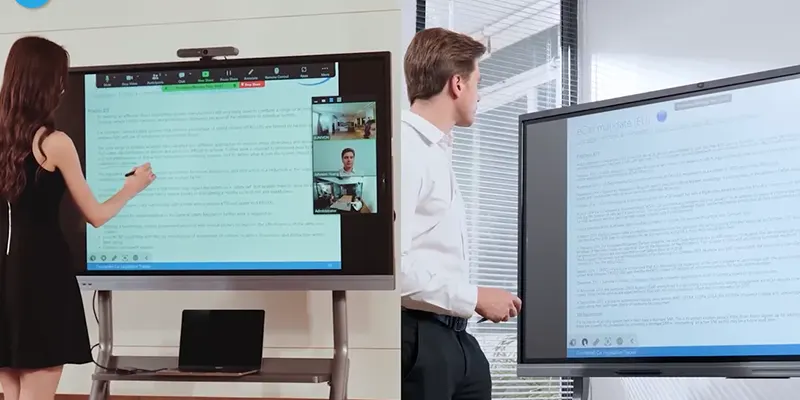
2. Key Differences Between Interactive Boards and Smart Boards
Although the terms overlap heavily, there are still meaningful differences worth understanding.
Brand Name vs Generic Category
The most important distinction is simple:
· Interactive board = a broad product category
· Smart Board = originally a specific brand/product line
This is the root of the confusion. Every SMART Board is an interactive board, but not every interactive board is a SMART Board.
Hardware and Display Technology
Older SMART Boards often relied on projector systems paired with touch-sensitive whiteboards. Many modern interactive boards now use LED interactive flat panels with 4K resolution and anti-glare coatings.
Interactive flat panels generally provide:
· Better brightness
· Sharper visuals
· Lower maintenance
· Faster touch response
· Improved durability
Modern businesses and schools increasingly prefer flat panel systems because they eliminate projector maintenance costs and provide better visibility in bright rooms.
Software Ecosystem
SMART Boards often include proprietary software ecosystems designed specifically for education and collaboration. Interactive boards from other manufacturers may rely on Android systems, third-party apps, or open collaboration platforms.
Software compatibility matters more than many buyers realize. Some systems integrate seamlessly with:
· Google Workspace
· Microsoft Teams
· Zoom
· Cloud storage platforms
· Educational learning management systems
Connectivity and Collaboration Tools
Modern interactive displays often include:
· Wireless screen sharing
· USB-C connectivity
· Cloud whiteboarding
· Multi-device casting
· Remote collaboration tools
Some premium systems even include AI-powered meeting summaries and smart camera tracking features.
3. Which One Is Better for Classrooms?
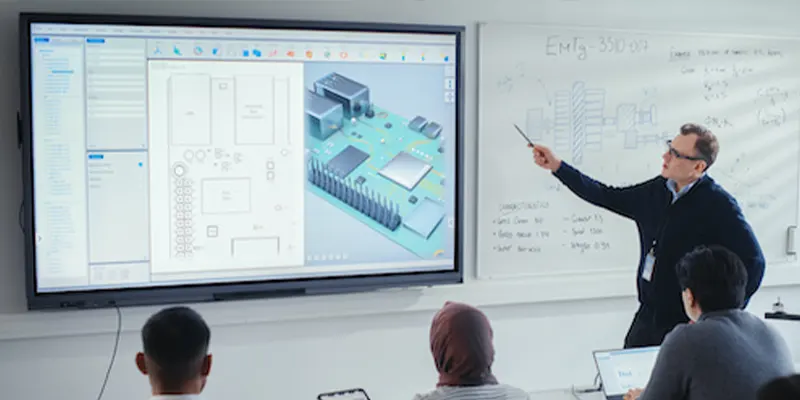
For education, the best option depends on teaching style, classroom size, and software needs. SMART Boards remain popular because of their educational software ecosystem and long-standing classroom presence.
However, many schools now choose interactive flat panels from other brands because they offer:
· Better value
· Lower maintenance
· Modern collaboration features
· Flexible operating systems
· Competitive pricing
Interactive flat panels also support multimedia teaching more effectively. Teachers can combine videos, annotations, live web browsing, and interactive activities in one seamless experience.
Student engagement tends to improve when lessons become interactive rather than lecture-based. Research consistently shows that visual and touch-based learning can improve participation and retention.
4. Which One Works Better for Business Meetings?
Businesses often prioritize collaboration and conferencing features over classroom software. Modern interactive displays designed for conference rooms now include:
· Video conferencing integration
· Wireless collaboration
· Remote team participation
· AI meeting tools
· Digital whiteboarding
Hybrid work has made these features increasingly important. Teams now expect seamless collaboration between in-office and remote employees.
Conference room smart boards have evolved into complete communication hubs rather than simple presentation screens.
5. How to Choose the Right Interactive Display?
Choosing the right system starts with understanding your actual needs.
Ask yourself:
· Is this mainly for education or business?
· Will remote collaboration matter?
· Do you need built-in software?
· How important is multi-touch support?
· What size room will it be used in?
For schools, educational software and durability may be top priorities. For businesses, conferencing integration and wireless collaboration often matter more.
It is also smart to think long-term. Technology evolves quickly, so choosing a flexible platform with regular software updates can extend the lifespan of your investment.
6.Conclusion
The difference between an interactive board and a smart board mostly comes down to terminology and branding. An interactive board is the broader category of touch-enabled collaborative displays, while Smart Board originally referred to products from SMART Technologies.
The right interactive display can completely transform classrooms, meetings, training sessions, and collaborative workspaces. Whether you call it an interactive board or a smart board, the goal remains the same: making communication more engaging, visual, and interactive.
FAQs
1. Is a Smart Board the same as an interactive board?
Not exactly. A Smart Board is technically a product line from SMART Technologies, while an interactive board is a general category of touch-enabled displays.
2. Which is better for classrooms: interactive boards or Smart Boards?
Both can work well in classrooms. SMART Boards are known for educational software integration, while many modern interactive boards offer lower maintenance and flexible collaboration tools.
3. Are interactive flat panels better than projector-based smart boards?
In most cases, yes. Interactive flat panels usually provide brighter displays, better touch accuracy, lower maintenance, and sharper 4K visuals.
4. Can interactive boards be used for video conferencing?
Yes. Many modern systems support Zoom, Microsoft Teams, Google Meet, and wireless collaboration features.
5. How much does a modern smart board cost?
Pricing varies depending on size and features. Entry-level systems may start around $1,500, while premium large-format displays can cost several thousand dollars.
6. Sonuç